
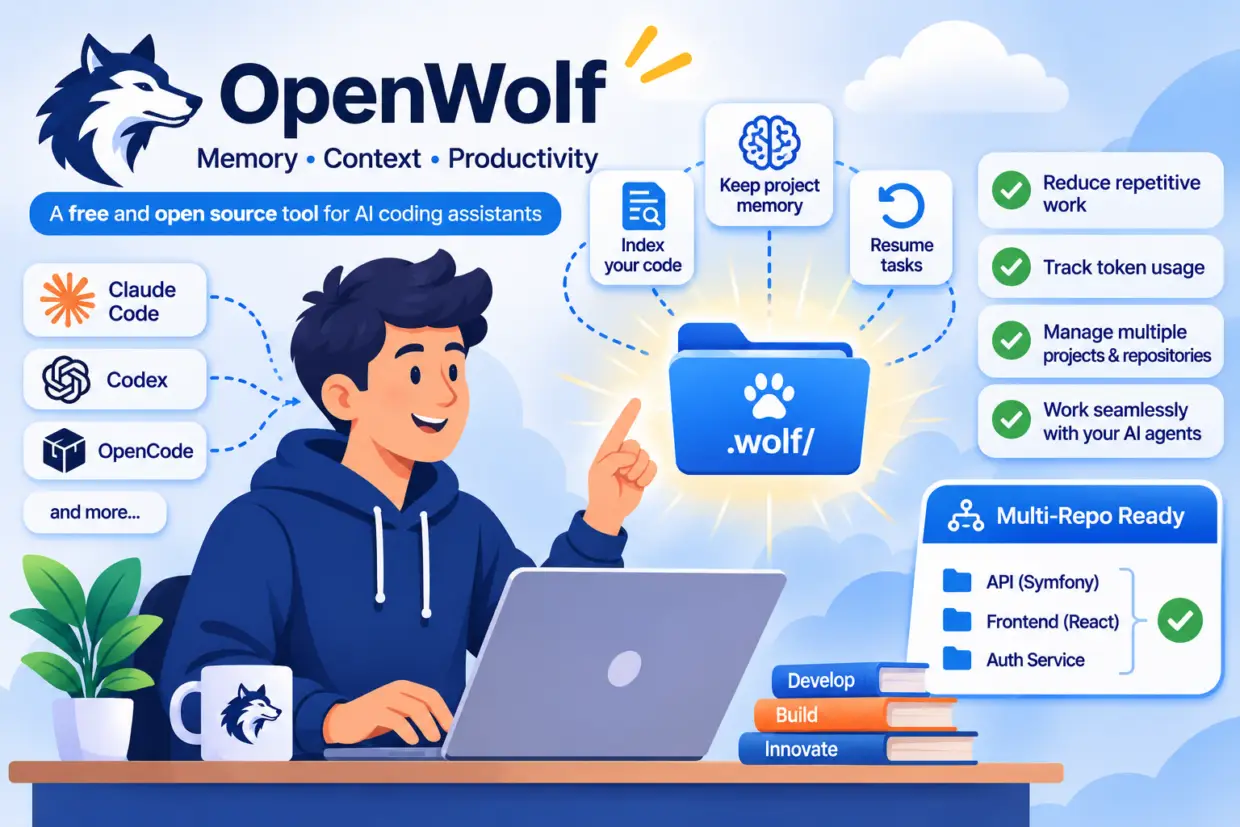
AI-powered coding assistants such as Claude Code, Codex, and OpenCode have become valuable collaborators for developers. However, using them on a daily basis still comes with a few challenges: losing context between sessions, repeatedly explaining the same things, struggling to retrieve previous decisions, and wasting tokens.
This is exactly where OpenWolf comes in.
The good news is that OpenWolf is free and open source, released under the AGPL-3.0 license. Its source code is publicly available on GitHub, and anyone can install it for their own projects. The license also permits commercial use, subject to its requirements, including source-code disclosure obligations in certain circumstances.
Its goal is straightforward: provide persistent memory and context management tools for AI coding assistants. It helps them retrieve important project information, keep track of previous work, and resume tasks without starting from scratch.
In this tutorial, we’ll explore OpenWolf, install it, understand how it works, and see how to use it effectively, including when working across multiple projects and Git repositories.
Actual OpenWolf version is : 2.5.3
1. What Is OpenWolf?
OpenWolf is a memory and context management layer designed for AI coding agents.
When developers work with Claude Code, Codex, or OpenCode, each session generates a lot of useful information:
- The objectives of the current task.
- Files that have been modified and features that have been developed.
- Technical decisions that have been made.
- Issues encountered and how they were resolved.
- Tests that have been run and any remaining problems.
- The next steps in the development process.
The problem is that this information is not always readily available when starting a new session. An agent may forget a previous decision, reread the same files several times, or ask the developer to explain the project architecture all over again.
OpenWolf aims to eliminate this repetition by maintaining persistent, local project memory.
Shared Memory Across Multiple Agents
OpenWolf organizes project information in a .wolf/ directory created at the root of the project.
This directory contains, among other things:
- An index of the project’s architecture and files.
- Notes about conventions and technical preferences.
- The current project status.
- A history of known issues and their fixes.
- Information needed to resume tasks.
- Agent usage tracking data.
The key advantage is that developers are no longer entirely dependent on an AI assistant’s conversational history. Useful information is stored in local files and can be accessed by multiple compatible agents.
Which Agents Are Supported?
OpenWolf provides several levels of integration:
| Agent | Integration |
|---|---|
| Claude Code | Hooks and advanced features |
| Codex CLI | Project hooks and AGENTS.md instructions |
| OpenCode | Native plugin and project instructions |
| Grok Build | Hooks compatible with Claude’s |
| Cursor | Project instructions |
| Gemini CLI | Project instructions |
| Antigravity | Project instructions |
Keep in mind that not all integrations offer the same capabilities. Claude Code, Codex, and OpenCode benefit from the most advanced integrations. For some other agents, OpenWolf primarily provides context and instructions without all the advanced tracking mechanisms.
2. Installing and Configuring OpenWolf
OpenWolf requires Node.js 20 or later. It runs on Windows, macOS, and Linux.
Installation is straightforward using npm.
Step 1: Install OpenWolf
Open a terminal and run:
npm install -g openwolfThis installs OpenWolf globally, making its command available from your different projects.
Step 2: Initialize Your Project
Navigate to your project directory:
cd my-projectThen run the initialization command:
openwolf initOpenWolf detects the installed development agents and configures the corresponding integrations.
You can also explicitly select which agents to configure:
openwolf init --agent claude codex opencodeThe tool then creates the .wolf/ directory, initializes the memory files, and performs an initial project scan.
Depending on the agent being used, additional permissions or trust confirmations may be required. Make sure to review them before accepting.
Step 3: Verify the Installation
To check that everything is working correctly, run:
openwolf --version
openwolf status
openwolf operations doctor
These commands let you check the installed version, integration status, and any configuration issues.
Once installation is complete, start a new session with your development agent.
3. Understanding OpenWolf’s Main Features
OpenWolf does more than simply save notes. It provides several mechanisms designed to improve workflow continuity and reduce repetitive operations.
Project Indexing
OpenWolf builds a representation of your project to make file and symbol searches easier.
This index helps the agent understand where important code elements are located, how they relate to one another, and which files are likely to be relevant to a given task.
To refresh the index:
openwolf scanTo search for a symbol:
openwolf find validateTokenTo retrieve information about a specific file:
openwolf find --file src/auth.tsYou can also request a project overview:
openwolf mapOr focus that overview on a particular area:
openwolf map --focus authThese commands are particularly useful in large projects, where finding the right files can account for a significant portion of development time.
Persistent Memory
OpenWolf stores different categories of information in .wolf/.
Some important files include:
| File | Purpose |
|---|---|
anatomy-index.json | Technical project index |
anatomy.md | Human-readable architecture overview |
memory.md | Session notes and observations |
STATUS.md | Project status and next steps |
cerebrum.md | Project conventions and preferences |
buglog.json | Known issues and fixes |
token-ledger.json | Usage tracking data |
This allows the agent to retrieve useful information without having to reread the entire conversation history every time.
However, it’s worth remembering that OpenWolf cannot automatically infer every decision made during a session. Memory quality also depends on the information that is actually recorded.
Checkpoints and Resuming Work
Another useful feature is the ability to resume tasks.
A checkpoint can preserve information such as:
- The original objective.
- Work already completed.
- Outstanding issues.
- Relevant files.
- The next action to perform.
OpenWolf also provides context handover mechanisms between Claude and Codex.
This makes it possible to start a task with one agent and pass the relevant information to another without having to explain everything again.
This is not a complete and automatic transfer of every conversation. Instead, OpenWolf transfers selected and saved context.
Token Usage Tracking
OpenWolf also provides usage tracking for development agents.
It can retrieve available counters from different environments, including Claude, Codex, and OpenCode.
This makes it possible to monitor information such as:
- Input tokens.
- Output tokens.
- Cached tokens, when available.
- Models being used.
- Estimated API costs.
To generate a usage report:
openwolf usage report --jsonHowever, it is important to distinguish between data actually reported by the agents and locally calculated estimates. Available information depends on each environment and may be incomplete.
Cost estimates are based on reference API prices. They do not necessarily reflect the amount charged under a subscription plan.
4. The OpenWolf Dashboard
OpenWolf includes a dashboard that lets you visualize the information stored for a project.
To launch it:
openwolf dashboardThe dashboard provides access to:
- Project memory.
- The file and code index.
- Task recovery information.
- OpenWolf activity history.
- Agent usage data.
- Integration health status.
It allows you to monitor operations and check that memory and tracking mechanisms are working correctly.
The dashboard is designed for local use. By default, it listens on 127.0.0.1 and requires a project token. It should therefore not be treated as a public web service ready to be exposed to the Internet.
5. Working Across Multiple Projects and Git Repositories
This is probably one of the most interesting use cases for developers working on multiple applications.
In a professional environment, developers often work on several projects simultaneously:
- A Symfony API.
- A React or Vue.js application.
- An authentication service.
- A mobile application.
- Several shared libraries.
- Repositories containing common technical components.
Without a memory mechanism, each project requires developers to explain its architecture and conventions to the AI agent again. And when several repositories are involved in the same feature, things become even more complicated.
Independent Memory for Each Project
OpenWolf organizes memory at the project level.
In practice, each repository can have its own .wolf/ directory.
For example:
workspace/
├── symfony-api/
│   ├── .wolf/
│   ├── src/
│   └── composer.json
│
├── react-frontend/
│   ├── .wolf/
│   ├── src/
│   └── package.json
│
└── auth-service/
    ├── .wolf/
    ├── src/
    └── package.json
Each project maintains its own information:
- Its architecture.
- Its conventions.
- Its known issues.
- Its technical decisions.
- Its development history.
This separation prevents unrelated project contexts from being mixed together, especially when different technologies or rules are involved.
Working Across Multiple Repositories for a Single Feature
Imagine you’re developing a feature that requires changes in three repositories:
- A Symfony API to expose new data.
- A React frontend to display that data.
- An authentication service to manage permissions.
You can initialize OpenWolf independently in each repository.
The agent then has access to memory specific to each environment. It can retrieve the technical information associated with the repository it is currently working on.
However, this should not be confused with a global memory automatically shared across all repositories. The .wolf/ directories remain independent.
To maintain consistency across multiple projects, it is therefore a good idea to document shared conventions and dependencies between repositories, then make this information available to the relevant agents.
Context Handover Between Agents
OpenWolf also provides handover mechanisms between Claude and Codex.
They allow selected context to be transferred, including objectives, completed changes, and next steps.
This is particularly useful when developers use different assistants depending on the task. For example, Claude Code for a feature implementation and Codex for another stage of development.
This transfer is still based on saved and selected information. It does not guarantee complete and automatic synchronization of every session or repository.
6. Security and Usage Considerations
Like any tool that handles technical information and project files, OpenWolf should be used with a few precautions.
Several security mechanisms are provided:
- The dashboard listens on the local interface by default.
- Dashboard access requires a project token.
- Hooks do not automatically authorize commands executed by the agent.
- Context handover imports perform checks, including project identity and certain source-related information.
- Sensitive-file exclusions and path checks help reduce accidental exposure risks.
One point deserves particular attention: the .wolf/ directory may contain information about your application’s internal workings.
Before sharing these files through Git or with other team members, take the time to review their contents. Sensitive-information detection mechanisms are not a substitute for human review.
Finally, notes and information stored by OpenWolf should be treated as untrusted context. They should not automatically become instructions authorized to perform sensitive operations.
7. Essential OpenWolf Commands
Here is a summary of the commands you’ll find most useful in everyday development.
| Command | Purpose |
|---|---|
openwolf init | Initializes OpenWolf in a project |
openwolf status | Checks installation status |
openwolf operations doctor | Diagnoses operational issues |
openwolf scan | Refreshes the project index |
openwolf find <query> | Searches for a file or symbol |
openwolf map | Displays a project overview |
openwolf report | Retrieves operational information |
openwolf usage report --json | Generates a usage report |
openwolf handoff list | Lists sessions available for handover |
openwolf handoff search <query> | Searches saved context information |
openwolf memory archive | Archives eligible old notes |
openwolf dashboard | Launches the dashboard |
openwolf update | Updates registered projects |
openwolf self-update | Checks for runtime updates |
openwolf restore | Lists available backups |
To discover the exact options available for a command, you can also consult the official documentation.
Conclusion: Persistent Memory for AI-Augmented Developers
OpenWolf addresses a real challenge in the everyday use of coding assistants: losing context and repeating the same operations from one session to another.
By adding persistent memory, a technical index, task-resumption mechanisms, and usage tracking, it provides a useful layer on top of tools such as Claude Code, Codex, and OpenCode.
Its local operation, without additional AI model calls for memory and index maintenance, is another interesting advantage.
Of course, OpenWolf does not replace your AI assistant, nor does it guarantee a measurable reduction in token consumption. Instead, it provides a better-structured working environment in which agents can more easily retrieve the information they need.
For developers working across multiple projects or repositories, it is certainly worth exploring.
OpenWolf is freely available on GitHub:
Official website: https://openwolf.com/
Documentation: https://openwolf.com/getting-started
License: AGPL-3.0.